Tuesday, November 26, 2013

Build Hierarchy From Delimited String

In this post we create a parent child hierarchy (n level) from a delimited string like [Parent_Child_LeafChild].

What we are looking for is taking a n length string like "Stage1_Stage2_Stage3" and moving it into a table to build this:
Stage1
--Stage2
----Stage3

DECLARE @separator_position INT -- This is used to locate each separator character
DECLARE @array_value VARCHAR(1000)-- this holds each array value as it is returned
DECLARE @separator char(1) --Used in WHERE clause

declare @StageLevel varchar(255) = 'Stage1_Stage2_Stage3'
declare @holder varchar(255) = @stagelevel
SET @separator = '_' --Separator A.K.A. Delimiter
SET @StageLevel = @StageLevel + @separator --append ',' at the end
-- select PATINDEX('%[' + @separator + ']%', @StageLevel)
Declare @Level int = 0
Declare @ParentId int

  WHILE PATINDEX('%[' + @separator + ']%', @StageLevel) <> 0
      BEGIN -- patindex matches the a pattern against a string
             SELECT @separator_position = PATINDEX('%[' + @separator + ']%',@StageLevel)

             SELECT @array_value = LEFT(@StageLevel, @separator_position - 1) 
                      set @level = @level +1

                     --select @array_value, @level
                     IF @level =1 --This is parent node
                     Begin
                           insert into Hierarchy (StageLevelName, StageLevel)    
                           values (@array_value, @Level)
                     END   
                     ELSE
                     BEGIN
                           insert into Hierarchy (StageLevelName, StageLevel, ParentID)
                           values (@array_value, @Level, @ParentId)
                     END
                     set @ParentId = @@IDENTITY
                     select @ParentId
                     --Moving to end of array
                     SELECT @StageLevel = STUFF( @StageLevel, 1, @separator_position, '')
      END

The end result will be a table with each row as a recursive hierarchy. Plus it has level information for depth.

Wednesday, October 16, 2013

Moving Closer To MCSA: SQL Server 2012


Last week I passed:
Exam 457 Transition your MCTS on SQL Server 2008 to MCSA: SQL Server 2012 -Part 1

Which will help me to qualify for Microsoft Certified Solutions Associate for SQL Server 2012. Now am preparing for 458 (Part 2).


The exam was moderately hard and I had doubts about couple of questions. Anyways getting through the course material helped me a lot in knowing SQL Server 2012.


Cheers!

Wednesday, June 20, 2012

Content Organizer Rule Manager for SharePoint 2010


I am proud to release the beta version of Content Organizer Rule Manager (codename CORMa) for SharePoint 2010 today.

Background:
Working on a SharePoint 2010 enterprise project we had tons of content types on differest site. Creating and tracking content organizer rules from SharePoint interface was tedious going back and forth between pages. There is no option in SharePoint Designer to manager content organizer rules. Lastly there was a need to bulk create rules as some of our libraries had multiple content types associated.

CORMa to the rescue!
  • List and create content organizer rules in bulk.
  • Delete rules.
  • Works for all field types inlcuing Taxonomy fields.
  • Export all site content types with associated lists to text file.
  • Check inherent SharePoint rules for rule creation.
Download, test and give feedback...

Tuesday, June 19, 2012

XSL Link for SharePoint 2010 Web Parts

When using a lot of Links list in SharePoint 2010 the view can be quite 'boring'. To add some spice I have created an XSL style sheet and applied to List webpart through web part properties. Easy and fast:
  1. Get the XSL style sheet.
  2. Modify (if required)
  3. Upload to Style Library > XSL Style Sheets
  4. Edit web part and under Miscellaneous > XSL Link paste the path.
  5. Set Appearance > Chrome Type to 'Border Only'. Apply and save.
 Style classes are embedded in the XSL file which you may move on to your CSS files.
This would work on any list which is created on 'Link' list. I have added some logic to get list name (title) using XSL functions as it is pretty hard to do so. Let me know if someone knows an easier way, I can get the title in SharePoint Designer but on actual page it disappears. I think the View node is not available when XSL renders on page.
   
Again, this XSL is targeted towards Links list in SharePoint 2010 but can be extended/reused for other libraries as well. Just change [@Columns] as per your CAML.

<xsl:stylesheet version="1.0"
  xmlns:xsl=http://www.w3.org/1999/XSL/Transform
  xmlns:msxsl="urn:schemas-microsoft-com:xslt"
  exclude-result-prefixes="msxsl"
  xmlns:ddwrt2="urn:frontpage:internal">
<xsl:output method='html' indent='yes'/>

<xsl:template match='dsQueryResponse' xmlns:ddwrt="http://schemas.microsoft.com/WebParts/v2/DataView/runtime">

<style>
  .QLinksHeader{
            PADDING-BOTTOM: 2px; PADDING-LEFT: 2px; PADDING-RIGHT: 2px;
            DISPLAY: block; MARGIN-BOTTOM: 2px; BACKGROUND: #0d5995; COLOR: white;
            FONT-SIZE: 14px; PADDING-TOP: 2px }
  #QLinks {
            PADDING-BOTTOM: 0px; LIST-STYLE-TYPE: none; MARGIN: 0px;
            PADDING-LEFT: 0px; PADDING-RIGHT: 0px; PADDING-TOP: 0px; }
  #QLinks LI {
            BACKGROUND-IMAGE: url(/_layouts/images/icongo.gif); PADDING-LEFT: 2em;
            BACKGROUND-REPEAT: no-repeat; MARGIN-LEFT: 8px; FONT-SIZE: 12px;
            PADDING-BOTTOM: 5px }
  #QLinks LI a:hover{ text-decoration:underline; }
</style>

  <div cellpadding="10" cellspacing="0" border="1" >
    <SPAN class="QLinksHeader">
      <xsl:value-of select=" substring-before(substring-after(/dsQueryResponse/Rows/Row/@FileRef,'Lists/'),'/')" >
      </xsl:value-of>
    </SPAN>
    <ul id="QLinks">
      <xsl:apply-templates select='Rows/Row'/>
    </ul>
  </div>
</xsl:template> <xsl:template match='Row'>
  <li>
    <a href="{@URL}">
      <xsl:value-of select="@URL.desc" ></xsl:value-of>
    </a>
  </li>
</xsl:template>
</xsl:stylesheet>

Friday, December 2, 2011

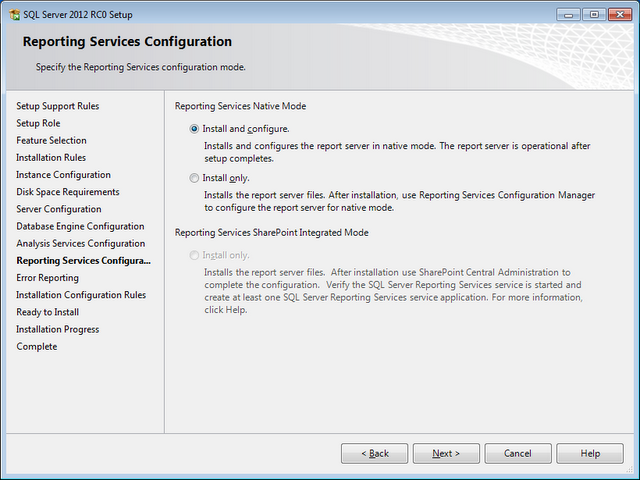
Installing SQL Server 2012 RC0 on Windows 7


SQL Server 2012 RC0, formerly known as “Denali”, is available to download. Got my copy and started installing on a copy on Windows 7 virtual box. The installation was smooth. 

Here are the steps:

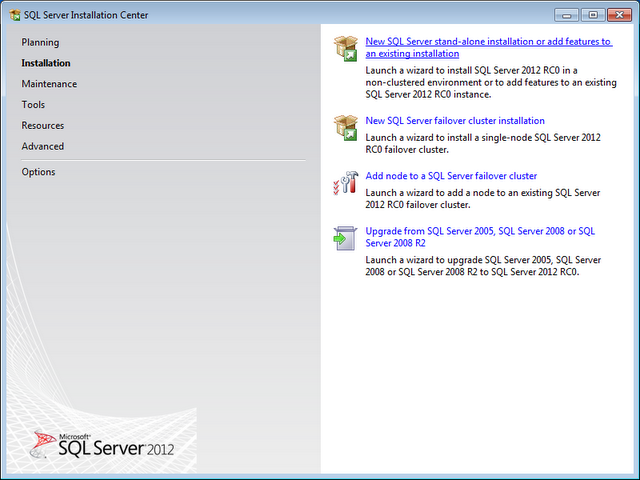
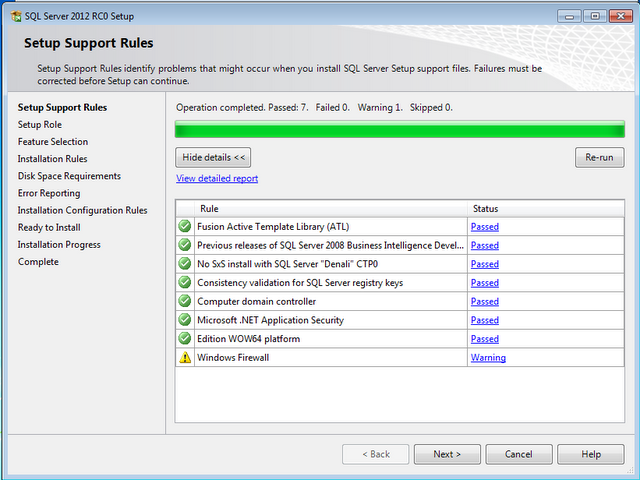
After extracting the download file, double click the setup.exe. Select the first option under installation to install a stand alone version.Some checks, no issues.
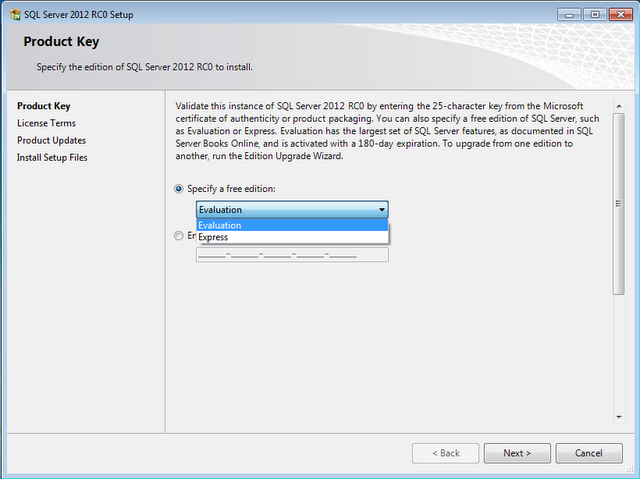
Choose what type of edition you want to get.Some more checks.
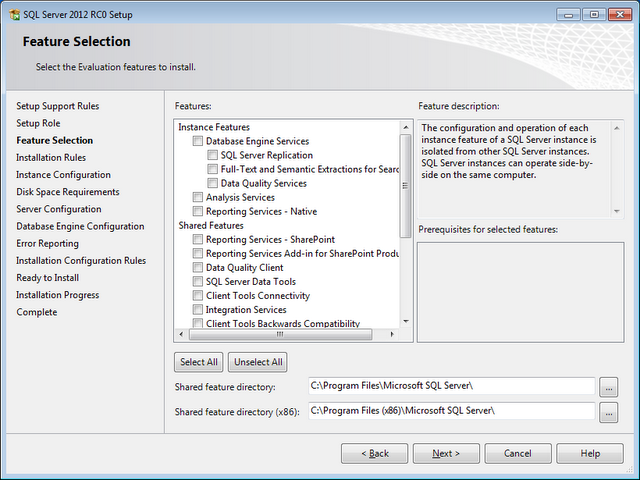
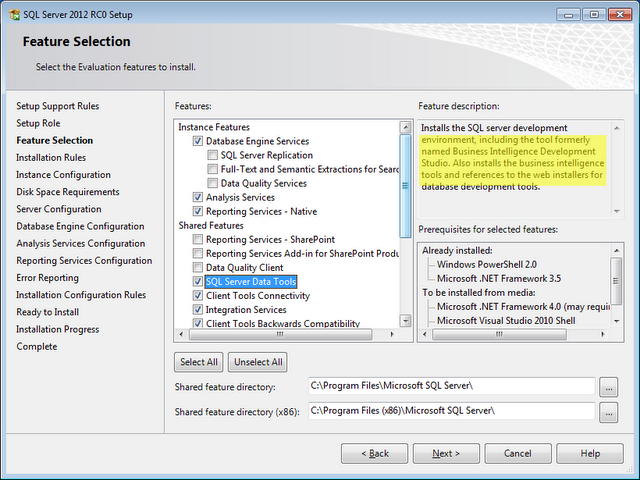
Standard feature installation.Select the components.
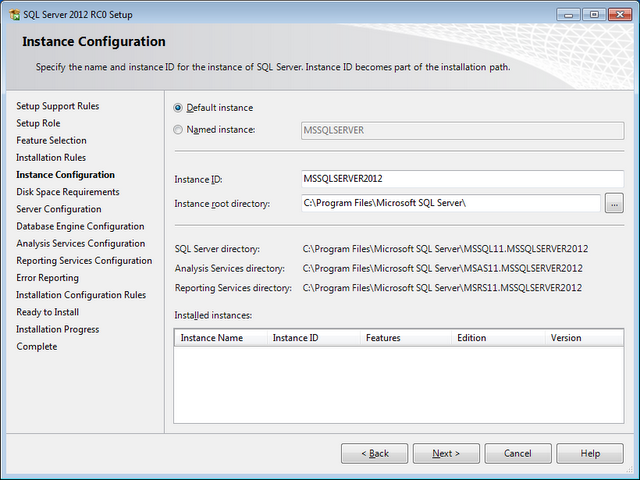
Wondering where is BIDS; it’s been named to SQL Server Data Tools.Setup the instance id.
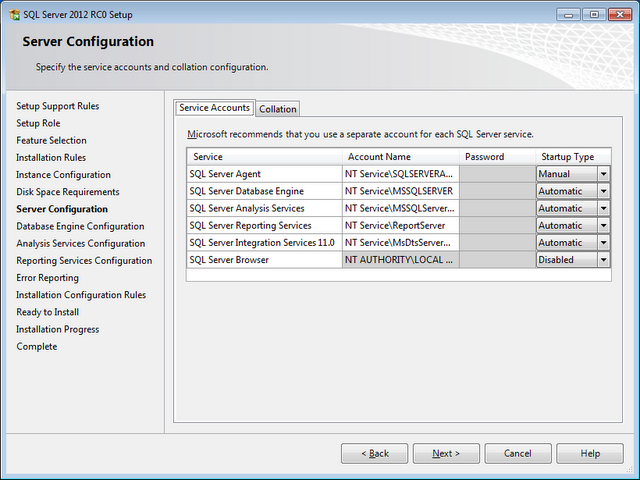
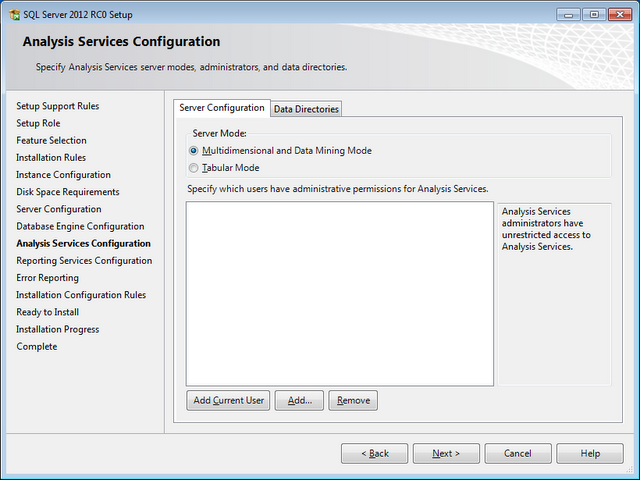
Configure roles to be used.Analysis services configurations.
Reporting Services settings.

Hit ‘Next’, rest of the steps are linear and at the end you have a successful SQL Server 2012.

Thursday, December 1, 2011

AdventureWorks and SQL Server 2012 RC0 and Access Denied

While attaching AdventureWorksDWDenali_Data.mdf to SQL Server 2012 RC0 if you get this error:
Unable to open the physical file "C:\Data\AdventureWorksDWDenali_Data.mdf". Operating system error 5: "5(Access is denied.)".

To fix Right Click --> Properties --> Security


Give Full Control access to the account you would be using.


Attach to database again.

Monday, November 21, 2011

Find out SQL Server Edition

Here is a query to find out what version and edition of SQL Sever you are using:

SELECT SERVERPROPERTY('edition') as Edition,
SERVERPROPERTY('productversion') ProdVersion,
SERVERPROPERTY('productlevel') as Lvl